A 1,900-student swim school runs evaluations, progress tracking, and instructor coaching with AI.
Flowline set up four tools built from the school's own procedures and data: voice-note lesson evaluations, daily focus sheets for swimmers who are starting to slow, an instructor insights dashboard, and a training hub for remote staff.
Deck supervisors file 42% more lesson evaluations since switching to voice.
The school's deck supervisors started turning spoken observations into finished evaluations in February 2026. Six months later, more of the team evaluates, and the evaluations read to one standard.
The same months of 2025 and 2026, so the seasonal swing in class volume cancels out.
Five wrote their first lesson evaluation after launch. Each kept a pace of about six a month, so the growth came from more people taking part.
Supervisors' typical evaluations now fall within 12 words of each other. Instructors get the same depth no matter who is on deck.
Source: the school's staff evaluation export, February 2024 to July 2026. Staff names withheld.
About the numbers
Against the six months just before launch, monthly volume is up 24%. The number of instructors evaluated rose 8% over the same period, so staff growth explains only a small part of the increase.
The middle half of all lesson notes spans 14 words, down from 22 a year earlier. Supervisors who began evaluating in 2025 or later wrote 52% of lesson evaluations since launch, and their notes run a median of 74 words, against 69 for longer-serving supervisors.
The export is dated August 14, 2026, and the analysis covers February 2024 to July 2026, the period under the school's current evaluation rubric. Counts include lesson evaluations only. Workshop attendance entries and the supervisor and front desk evaluations added in June 2026 are excluded.
Year-over-year figures compare February and April to July of 2025 with the same months of 2026. March 2025 holds only four lesson evaluations in the export, which points to missing records, so it is left out of both years. Six rows with unreadable dates are excluded.
Four tools, built from the school's own data
Select a tool for details.
Lesson evaluations a supervisor can finish on deck
The supervisor watches the lesson, talks through what they saw, and gets a finished evaluation in the school's voice. They edit it, pick the score, and file it to the instructor's profile in the school's staff evaluation system. In use since February 2026.
Running today- Voice note to finished evaluation, written to the school's rubric
- The supervisor reviews, edits, and scores every evaluation
- The supervisor copies it into the evaluation system by hand, and some need trimming to fit
- Feeds the same records Instructor Insights reads
- Built for a phone on the pool deck
- Every evaluation fits the evaluation system's character limit
- A score picker for each evaluation
- One tap files the evaluation and score
89 lesson evaluations a month, up from 63 in the same months a year earlier.
Preview of the standalone app in development. Sample instructor and notes.
Daily focus sheets that tell the deck who needs attention
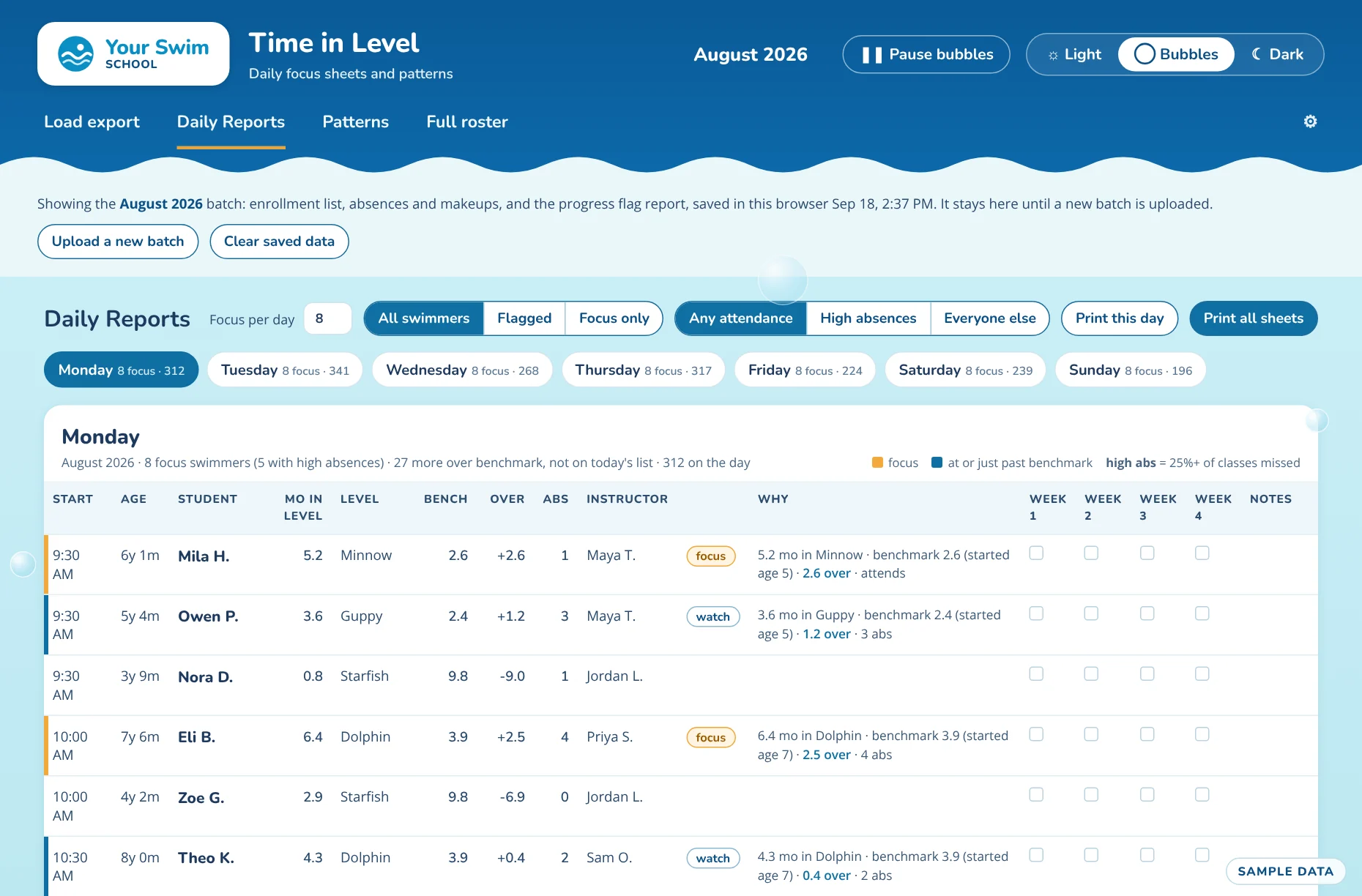
Time in Level reads three exports from the school's enrollment system: the student list, absences and makeups, and the "not progressing" flags. It compares each swimmer's months in a level with a benchmark for that level and starting age, then builds a focus sheet for every day of the week.
- Each day's sheet lists the swimmers to focus on, with the reason each one is there
- Benchmarks come from the school's completed level changes, by age, and stay fixed so improvement shows
- Swimmers behind because of absences are separated from those who attend and still stall
- Printed sheets carry week 1 to 4 boxes and notes, so follow-through is tracked
Staff step in with swimmers who are starting to slow, before they fall far behind.
See the school's real screen
 View full size
Every instructor's evaluations in one view
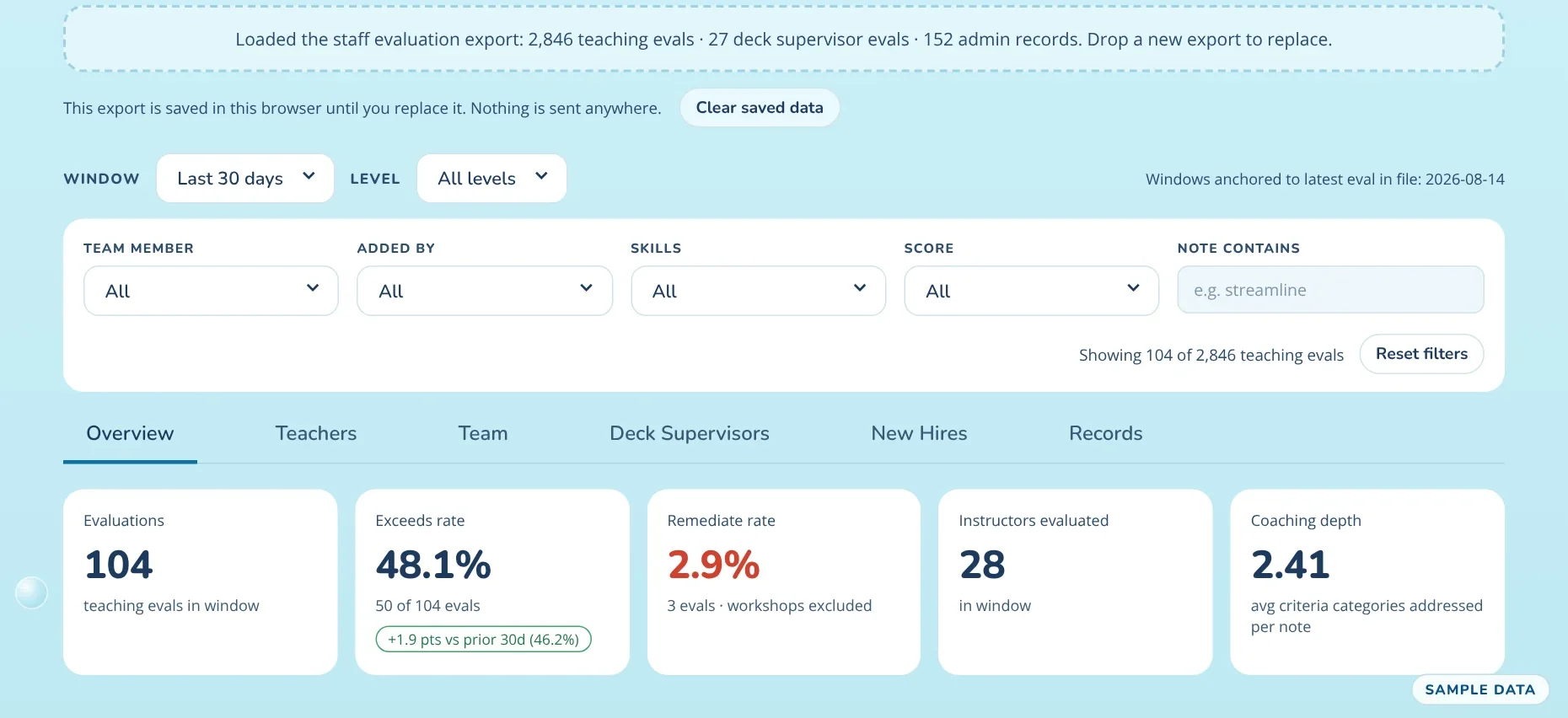
Instructor Insights reads the school's staff evaluation export right in the browser. Leaders filter by time window, level, instructor, evaluator, skill, score, or words in the notes, across six views: overview, teachers, team, deck supervisors, new hires, and records.
- Exceeds and remediate rates, with the change from the prior 30 days
- Coaching depth: how many criteria each evaluation note addresses
- A new hires view of each instructor's first three months
- 1-click meeting reports for supervisors
Supervisors walk into every instructor meeting with the record in hand.
See the school's real screen
 View full size
Training notebooks for a remote team
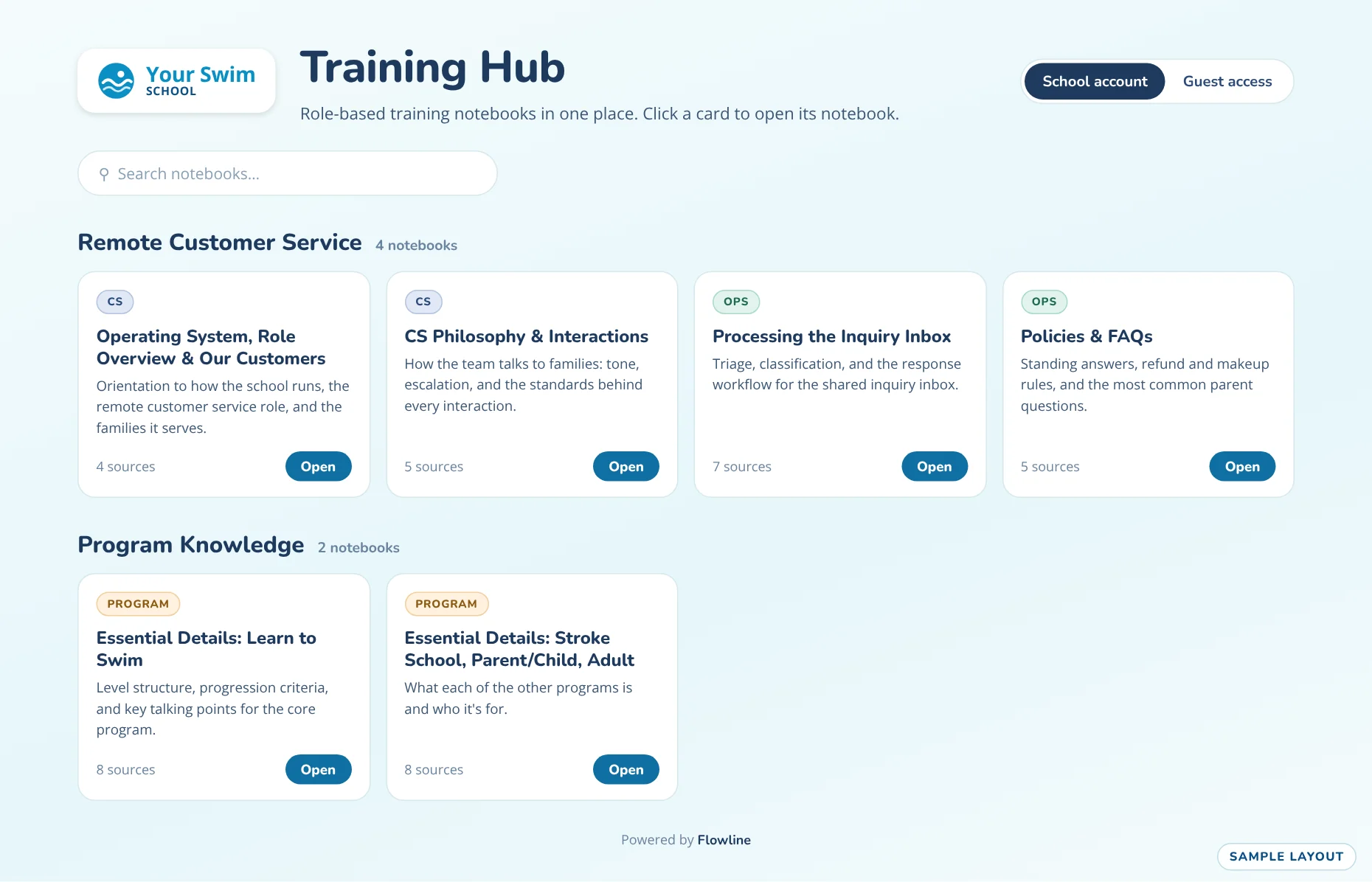
Hundreds of operational and training documents lived in different places. Flowline organized them into six role-based AI notebooks, grouped for remote customer service and program knowledge, behind one hub with search.
- Four customer service notebooks: orientation, talking with families, the inquiry inbox, and policies
- Two program notebooks covering the school's programs
- Each notebook answers from the school's own source documents
- Guided learning flows and knowledge checks for new staff
Remote staff find answers in the school's own words during real calls.
See the school's real screen
 View full size
Instructional Agents for your school
For any business that teaches in levels, belts, or grades.